Cut Invoice Cycle Under 10 Days with Permian Oilfield Data Integration

Oilfield data integration, for a Permian independent, means one thing: the financial signature captured at the point of work flows straight through to a posted well cost and a clean lease operating statement. Done right, every vendor charge lands on the correct well the day the work happens, not three weeks later during a scramble to close the books. The payoff is a predictable LOS and JIB cycle and fewer partner disputes over what a workover or a chemical treatment actually cost.
TL;DR:
- Accurate point-of-work capture with signed tickets at the wellsite ensures charges post immediately and prevents downstream reconciliation errors.
- A well-defined cost dictionary, owned by a single person and reviewed quarterly, prevents miscodes that lead to partner disputes during joint interest billing.
- Key integrations that truly matter include mobile ticket approval, invoice matching, automatic posting, and LOS and JIB exports, with API connections preferred for high volume.
- Rolling out data integration in phases, starting with disputed categories and smaller well samples, prevents staff resistance and ensures a reliable full-cycle implementation.
- Maintaining data accuracy over time requires enforcing the cost dictionary, monthly exception reviews, quarterly well master reconciliation, and sample audit checks.
Table of Contents
- What Does Oilfield Data Integration Look Like From Ticket to LOS?
- How Do You Build a Cost Dictionary That Doesn’t Fall Apart?
- Which Integrations Actually Matter for Oilfield Data?
- How Should Operators Roll Out an Integrated Data System?
- Who Owns Data Integration and Exceptions?
- What KPIs Prove the Integration Is Working?
- What Makes Integrating These Systems Difficult?
- What Changes When You Get Real-Time Well Cost Data?
- How Do You Keep Financial and Field Data Secure?
- Why Do Cloud Platforms Fit Small Operator Budgets?
- How Do You Keep Integrated Data Clean Over Time?
- A Field-Tested Take on What Actually Breaks Integration Projects
- See What WellsManager Does With Field Tickets, Costs, and LOS
- Sources
- FAQ
What Does Oilfield Data Integration Look Like From Ticket to LOS?
The flow has four handoffs, and most operators lose money at the seams between them, not inside any single step. Get the handoffs right and the rest takes care of itself.
- Point-of-work capture. A field supervisor or pumper logs the ticket on-site, with a named approver and a cost code attached before the vendor leaves. This is where you replace paper field tickets with something a well number and cost code can actually be pinned to.
- Invoice matching and AP routing. When the vendor invoice arrives, it gets matched against the original ticket, checked against the applicable AFE if one exists, and routed for invoice approval before it ever touches accounts payable’s queue.
- Posting to the cost book. Once approved, the charge posts to the well’s cost record under the standard cost code, and it reconciles against any AFE budget so overruns show up immediately instead of at quarter’s end.
- LOS and JIB generation. The lease operating statement and joint interest billing pull straight from posted, matched costs, with the ticket, invoice, and approval trail attached as backup. A disciplined monthly close, matching every invoice to the right well and AFE before generating the JIB, is what keeps partners paying on time instead of learning to expect late statements, according to Valor’s guide to joint interest billing.
Skip step one and every downstream step inherits the guesswork. That’s the whole argument for capturing the signature and the cost code together, at the wellsite, instead of reconstructing intent from a stack of invoices later.
How Do You Build a Cost Dictionary That Doesn’t Fall Apart?
A cost dictionary is the single document that decides whether “workover” means the same thing to your field supervisor, your AP clerk, and your partner’s auditor. Without one, three people code the same chemical treatment three different ways, and every one of those miscodes turns into a phone call during JIB season.
Structure it around lifecycle phase, then cost category, then real examples:
- Drilling. Cost categories like rig time, casing, and cementing, each with a short list of what qualifies and what does not.
- Completion. Frac, wireline, flowback, with anti-examples (a workover after first production does not belong here).
- Lease operating expense. Chemicals, workovers, saltwater disposal (SWD), pumper labor, each tied to a specific account.
- Required metadata. Every code needs a linked source document, a named approver, a date, and a place to log exceptions when something doesn’t fit cleanly.
Guidance on standardizing cost coding recommends exactly this structure: an account, concrete examples of what belongs, and explicit “does not belong” language, backed by a documented audit trail for every exception. One person owns the dictionary and reviews it quarterly. Everyone else follows it.
Pro Tip: Roll out the dictionary starting with your three most disputed categories, usually chemicals, workovers, and SWD hauling, and run them in parallel with your old process for one full close cycle before you retire the notebook.
Which Integrations Actually Matter for Oilfield Data?
Most of what gets sold as “integration” is noise. For a Permian independent, only a handful of capabilities move the needle:
- Mobile ticket capture with a required approver signature at the wellsite, not a signature collected days later from memory.
- OCR or line-item matching between the vendor invoice and the original field ticket, so a $4,200 chemical invoice doesn’t post against a $2,800 ticket unnoticed.
- Automatic posting to the well cost book, tagged to the right AFE where one applies.
- LOS and JIB export that pulls posted, matched costs without a manual rebuild in a spreadsheet every month.
- Well master sync, so every system references the same well name and number instead of three slightly different spellings.
On the integration pattern itself, you have three real options: a direct API connection between your ticketing and accounting systems, a scheduled export/import on a fixed cadence, or manual CSV upload as a stopgap. API connections are worth it once volume justifies the setup cost. Scheduled exports work fine for smaller operators running a handful of wells. Manual CSV import is acceptable only as a bridge, never as the permanent plan, because every manual touch is another place for a well number to get fat fingered.
The mistake to avoid: bolting oilfield tickets onto a generic AP tool that has no concept of an AFE, a joint interest split, or LOE coding, unlike specialized Oil & Gas Sheet Metal Fabrication in China | Get A Quote solutions tailored for industry vendor workflows. Oil-and-gas-specific AP automation handles those natively; general-purpose tools require workarounds that quietly break the first time someone changes a template.
How Should Operators Roll Out an Integrated Data System?
The biggest mistake in any rollout is trying to convert everything at once. A phased approach gets you to clean data faster and with less staff revolt.
- Baseline audit. Pull the last three months of invoices and tickets and count how many charges lack a matching ticket. That number is your starting point, and it’s usually worse than people expect.
- Align to your close calendar. Pick a start date that lands at the beginning of a close cycle, not in the middle of one.
- Pilot on a small scope. Choose five to ten wells and one vendor category, chemicals or workovers work well because disputes there are already common, and run the new process end to end.
- Expand to full LOE and AFE enforcement. Once the pilot clears a full close cycle clean, add the rest of your wells and start enforcing AFE checks on every invoice.
- Automate LOS and JIB generation. With coding and matching stable, turn on automated statement generation and compare it against your old manual process for one cycle before fully switching over.
- Check adoption. Look at how many tickets are missing signatures, how many invoices needed manual override, and whether field staff are actually using the new capture method or reverting to text messages.
Wenergy’s own rollout guidance backs this sequence: phase by disputed category first, run parallel coding for at least one close cycle, and only then retire the old process.
Pro Tip: Don’t announce a full cutover date to the field crew until the pilot has cleared one entire close cycle with zero manual corrections. A shaky pilot with a hard deadline attached is how you end up back on paper by month three.
Who Owns Data Integration and Exceptions?
Someone has to own the cost dictionary, full stop. Without a single named owner, every exception gets resolved differently depending on who answers the phone that day.
- Cost dictionary owner. Usually the controller or office manager. This person approves new codes, retires unused ones, and runs the quarterly review.
- Field supervisors. Responsible for accurate ticket capture and for the approval signature at the point of work, not after the fact.
- AP/controller staff. Handle invoice matching, flag mismatches between ticket and invoice amount, and execute postings to the well cost book.
- Exception log. Every miscoded or disputed charge gets a written note: what happened, who resolved it, and how. That log is what you hand a partner’s auditor when they ask why a charge landed where it did, since a traceable path from AFE to field ticket to invoice to approver is what keeps audits short instead of turning into a weeklong document hunt.
What KPIs Prove the Integration Is Working?
Track four numbers, no more. Invoice-to-post cycle time tells you how fast a charge moves from receipt to a posted well cost. Percent of charges with a matching field ticket tells you how much of your spend is still unverified. Miscoding rate tells you whether the cost dictionary is actually being followed. On-time LOS/JIB delivery tells partners whether they can trust your calendar.
Oilfield-specific AP automation has taken average invoice cycle times from roughly 45 days down to under 10 once field tickets, AFE checks, and joint interest coding are captured natively instead of bolted onto a generic tool.
Treat that range as a realistic target, not a guarantee. Present these four numbers to partners quarterly. A visible drop in cycle time and miscoding is the argument that gets holdout field staff to actually use the new process instead of falling back on a group text.
What Makes Integrating These Systems Difficult?
The technical challenge is rarely the software. It’s that field tickets, vendor invoices, and accounting records were built by different people at different times with no shared vocabulary. A pumper writes “SWD haul” on a ticket; the vendor invoice says “saltwater disposal services”; the accounting system has a line item called “produced water hauling.” Nothing connects them automatically.
The practical fix is well master synchronization: one canonical list of well names and numbers that every other system references, so a ticket for “Smith 4H” and an invoice for “Smith #4H” both land on the same well record instead of creating a duplicate. Small operators can get most of the way to enterprise-grade control here without buying an enterprise system, since the real fix is asset-level coding and well master sync, not a bigger platform.
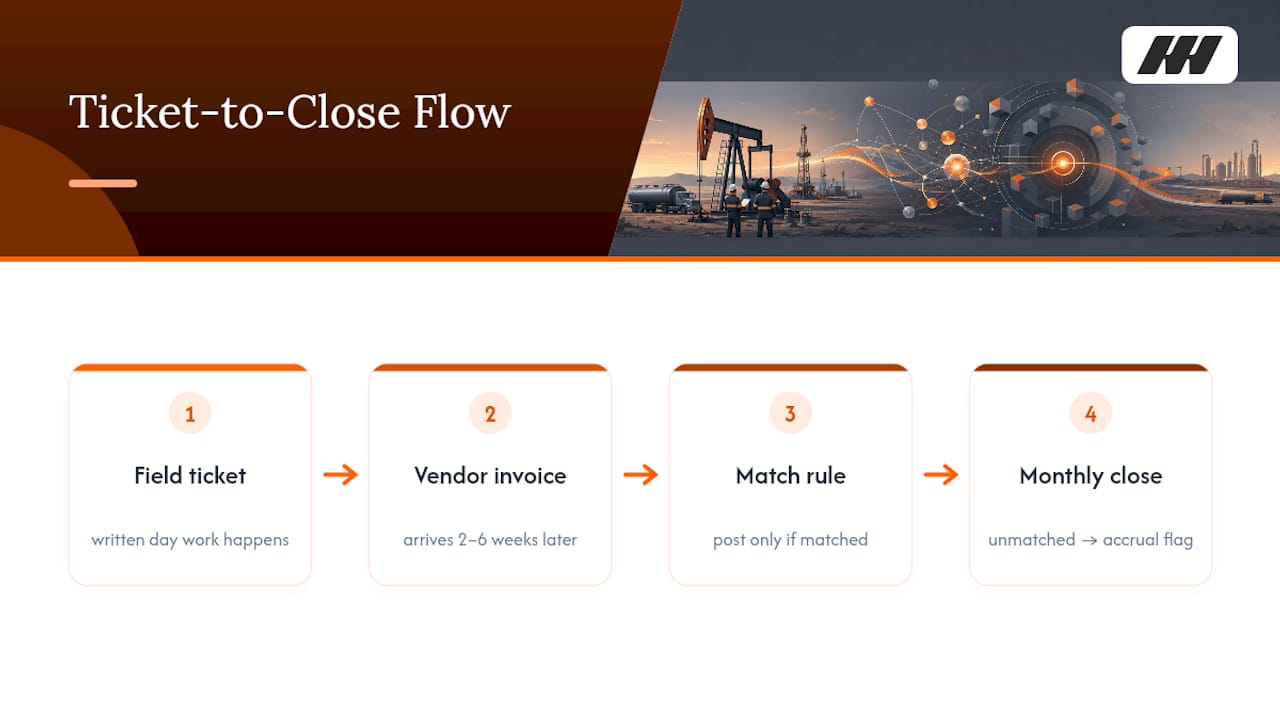
The second challenge is timing mismatches. A ticket gets written the day work happens; the invoice arrives two to six weeks later; the close happens on a fixed monthly date regardless of whether the invoice showed up. The fix isn’t faster software, it’s a rule: nothing posts without a matched ticket, and anything still unmatched at close gets flagged as an accrual instead of silently dropped or guessed at.
What Changes When You Get Real-Time Well Cost Data?
Waiting until month-end to find out a well is running over budget means the money is already spent. Real-time posting, where a ticket’s cost hits the well record within a day or two instead of at close, changes the decision from “why did this happen” to “should this keep happening.”
A field supervisor who can see a well’s cumulative workover spend against its AFE before approving the next charge makes a different call than one guessing from memory. An operations manager reviewing weekly, rather than monthly, per-well costs catches a vendor overbilling pattern in week two instead of finding it buried in twelve invoices at quarter’s end. The same real-time view is what turns a lease operating statement from a historical record into an operating tool. You stop asking “what did that well cost last month” and start asking “is this well still worth running at this spend rate.”
None of this requires sensor data or SCADA feeds. For an independent’s purposes, real-time simply means the field ticket and the vendor invoice post to the cost book within days, not weeks, so the number on the screen actually reflects reality when someone looks at it.
How Do You Keep Financial and Field Data Secure?
The data at stake here isn’t drilling telemetry, it’s vendor pricing, partner ownership percentages, and per-well cost detail, all of it sensitive in a different way. A leaked cost book tells a competitor exactly what you pay your vendors and how your wells are performing financially.
Practical security for a small operator comes down to a few habits: role-based access so a field supervisor can submit and view tickets for their wells but can’t see full financials across the company, audit logs on every posting and every edit to a cost code, and a documented approval trail so a partner’s auditor can trace any dollar back to an AFE, a ticket, an invoice, and a named approver without you having to reconstruct it by hand. That traceability is also your best defense in a partner audit; a clear chain of custody from field to finance answers most audit questions before they’re even asked. Compliance here isn’t a regulatory checkbox, it’s simply proving to your investors that the number on their check matches a documented, defensible cost.
Why Do Cloud Platforms Fit Small Operator Budgets?
A cloud-based system means your field supervisor in Midland and your bookkeeper working from home see the same ticket, the same day, without either one emailing a spreadsheet back and forth. For an operator running a handful of pumpers across scattered leases, that alone solves half the coordination problem paper never could.
The bigger advantage is that cloud platforms built for upstream operators, rather than generic accounting software, come with the well master structure, AFE tracking, and cost coding already built for how oil and gas actually works, instead of requiring you to bend a generic tool into shape. You’re not paying for server hardware, you’re not maintaining a database, and updates happen without you scheduling downtime. For a company with a two- or three-person office staff, that operational simplicity matters more than any feature list. It’s the difference between running your own IT department and just logging in.
How Do You Keep Integrated Data Clean Over Time?
Integration only helps if the data feeding it stays accurate, and that requires ongoing discipline, not a one-time setup. Four habits keep a system reliable months and years after rollout.
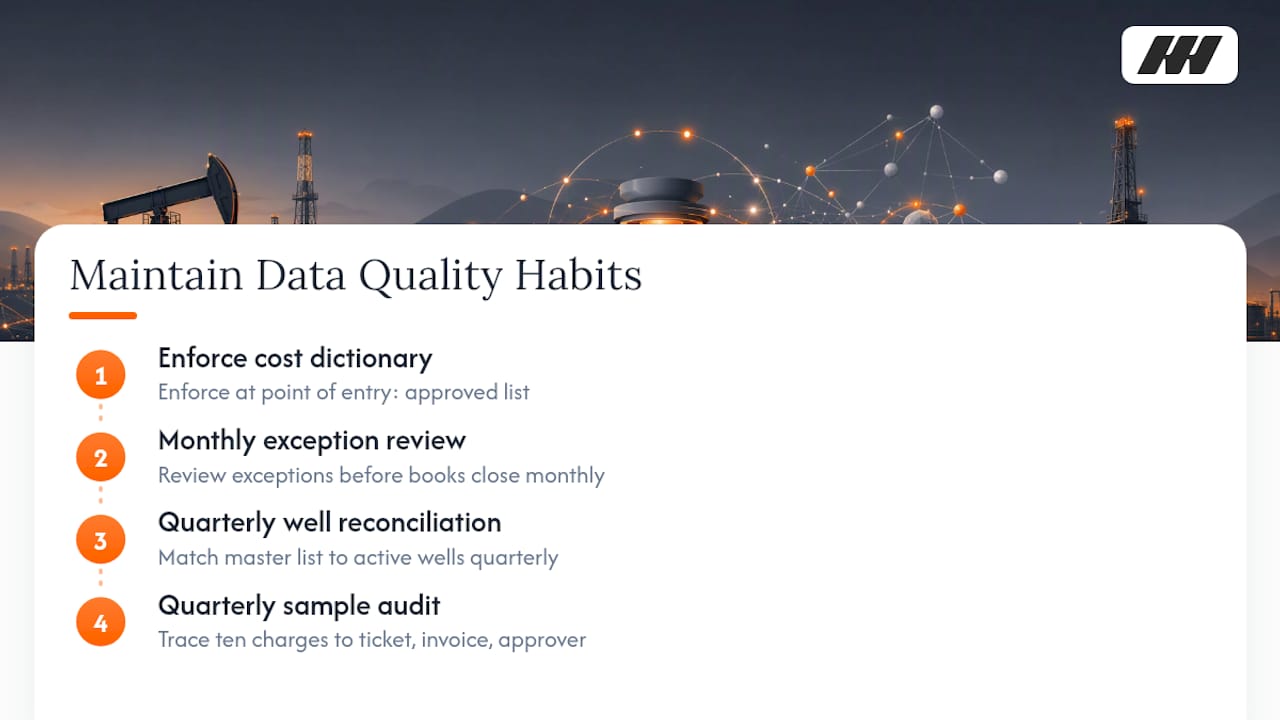
First, enforce the cost dictionary at the point of entry, not after the fact. If your ticketing tool lets someone pick a cost code freehand instead of from the approved list, you’ll have drift within a quarter. Second, run a monthly exception review: every charge that didn’t match a ticket, every code marked “other,” gets looked at by the dictionary owner before the books close, not after. Third, reconcile the well master list quarterly against your actual active well count. Wells get shut in, sold, or renamed, and a stale well master is where duplicate cost records quietly creep in.
Fourth, and most overlooked, audit a sample of postings against source documents every quarter, even when nothing seems wrong. Pull ten random charges and trace each one back to its ticket, invoice, and approver. If that trail breaks anywhere, you’ve found a process gap before a partner’s auditor does. Data quality isn’t a feature you buy, it’s a habit you keep, and the operators who skip this step are the ones who get surprised at JIB season.
A Field-Tested Take on What Actually Breaks Integration Projects
The rollouts that fail aren’t the ones with the wrong software. They’re the ones where half the field runs the new process and half sticks with a notebook or a group text, so the cost book ends up with two versions of the truth and nobody trusts either one. If you’re going to make the change, make it everywhere, on the same date, for every well.
The single highest-leverage move is capturing the financial signature at the point of work instead of collecting it later. Enverus has argued that this cultural shift matters more than any technical integration, and I agree. Double-signing, once in the field and again in the office, is where trust in the data quietly erodes.
Start with your worst categories. Chemicals, workovers, and saltwater disposal cause more partner disputes than everything else combined. Fix those first and the rest of the rollout gets easier.
— Pedro
See What WellsManager Does With Field Tickets, Costs, and LOS
WellsManager handles exactly three jobs, and nothing outside of them: field work tickets so costs get logged at the wellsite instead of a notebook, a well cost book so you can see what each well actually spent, and investor checks with a lease operating statement so partners get paid without a month-end scramble. In a demo, you’ll see a ticket captured in the field, matched to a vendor invoice, and posted to a specific well, then rolled straight into an LOS format your partners already expect. Most operators start with a pilot on a handful of wells and one vendor category, chemicals or workovers, run it alongside their current process for one close cycle, then expand once the numbers line up. If your JIB season currently means chasing down invoices and rebuilding spreadsheets by hand, request a demo at WellsManager and see what a single source of truth looks like for your wells.
Sources
Three sources make up nearly all the raw material for a Permian operator’s cost book. Field tickets are the largest and most error-prone: pumper logs, workover reports, chemical delivery slips, and SWD haul tickets, each one a candidate for a cost code if it’s captured with enough detail at the wellsite. Vendor invoices are the second: trucking, chemical suppliers, workover rigs, electrical contractors, each needing to match a ticket before it posts. AFEs, where they exist, provide the budget ceiling a charge should reconcile against.
Beyond those three, smaller but still relevant inputs include revenue and sales data from the operator’s purchaser statements, and any existing well master list that ties a well name to its API number, county, and operating interest. The mistake most operators make is treating these as separate filing systems, a folder of tickets here, a spreadsheet of invoices there, a purchaser statement PDF somewhere else, rather than three inputs that should all point back to the same well record. Oilfield data visualization, in practice, is nothing more than pulling these three sources into one place where a manager can see, well by well, what came in and what went out. Get the sources unified and the reporting writes itself; leave them scattered and every report becomes a manual reconciliation project.
- Ticket signed twice? Getting field spend out of the paper age — Enverus
- How to standardize cost coding in upstream oil & gas accounting and stop rework — Wenergy
- Joint interest billing (JIB) 101 for small operators — Valor
- AP automation for oil & gas companies explained — Vergo
FAQ
What Is Oilfield Data Integration for a Small Operator?
It’s the practice of connecting field work tickets, vendor invoices, and well cost records into one flow, so every charge posts to the correct well and feeds directly into the lease operating statement.
How Long Does a Data Integration Rollout Take?
A focused pilot on five to ten wells and one vendor category can clear a full close cycle in about a month; full rollout across all wells and AFE enforcement typically takes two to three additional close cycles.
What’s the Fastest Way to Cut Invoice Cycle Time?
Match every invoice to its field ticket at intake instead of after the fact. Oilfield-specific AP automation has taken average cycle times from around 45 days to under 10 once that matching happens natively.
Do I Need an ERP to Integrate Field and Financial Data?
No. A focused tool covering field tickets, a well cost book, and LOS/JIB reporting, like WellsManager, handles these three jobs without the overhead of a full ERP implementation.
What’s the Most Common Mistake in Cost Coding?
Letting field staff or AP pick codes freehand instead of from an approved dictionary. That’s how “workover” ends up meaning three different things depending on who wrote the ticket.