Invoice Approval Workflow for Upstream Oil & Gas Operators

An invoice approval workflow is the rules-based, auditable path an invoice follows from receipt to authorized posting. For independent upstream operators, the single most important design change is routing invoices by well, AFE, or cost code rather than by department. That one shift keeps costs posting to the correct well P&L in real time and makes month-end close a verification step instead of a forensic exercise.
Three things you can act on today:
- Create a single intake channel. One email address or portal for all vendor invoices eliminates the duplicate-payment risk that comes from invoices arriving by mail, email, and fax simultaneously.
- Enforce three-way line-item matching. Compare each invoice line against the purchase order and the field ticket or goods receipt at the unit price and quantity level, not just the footer total. Vendors sometimes adjust line details while leaving the total unchanged.
- Configure backup approvers and escalation timers. If the primary approver does not act within your defined SLA, the invoice automatically routes to a backup. Without this, invoices stall in personal inboxes every time a field supervisor is out of pocket.
Table of Contents
- Why does an invoice approval workflow matter for upstream operators?
- What are the core steps of an effective invoice approval workflow?
- What controls and software features do operators need?
- How do you roll out an invoice approval workflow in 4–6 weeks?
- What pitfalls should operators watch for?
- Which metrics prove your workflow is actually working?
- How does Wellsmanager address these needs for upstream operators?
- Key Takeaways
- The approval workflow most operators have is not actually a control
- Per-well invoice control, without the spreadsheet archaeology
- Useful sources and further reading
Why does an invoice approval workflow matter for upstream operators?
Poor routing and signature-only approvals create three compounding problems: per-well P&L drift, audit exposure, and vendor friction. When a field ticket for a workover gets coded to the wrong well or misclassified as capital instead of operating expense, that error compounds across every report downstream, from the lease operating statement to investor distributions.
Upstream operations generate a high volume of recurring service invoices: pumping services, chemical treatments, compression rentals, and periodic well maintenance. Each carries a different cost code, and many are tied to AFEs with hard spending limits. A workflow that routes by department instead of by AFE lets spending run past authorization before anyone notices.

The audit trail requirement is not optional. A system-recorded approval tied to the invoice image, with a timestamp and the approver’s stated rationale, is far stronger evidence than an email chain or a Slack thread. Segregation of duties, where the person who codes an invoice cannot also approve it, is the baseline control auditors expect to see documented.
What are the core steps of an effective invoice approval workflow?
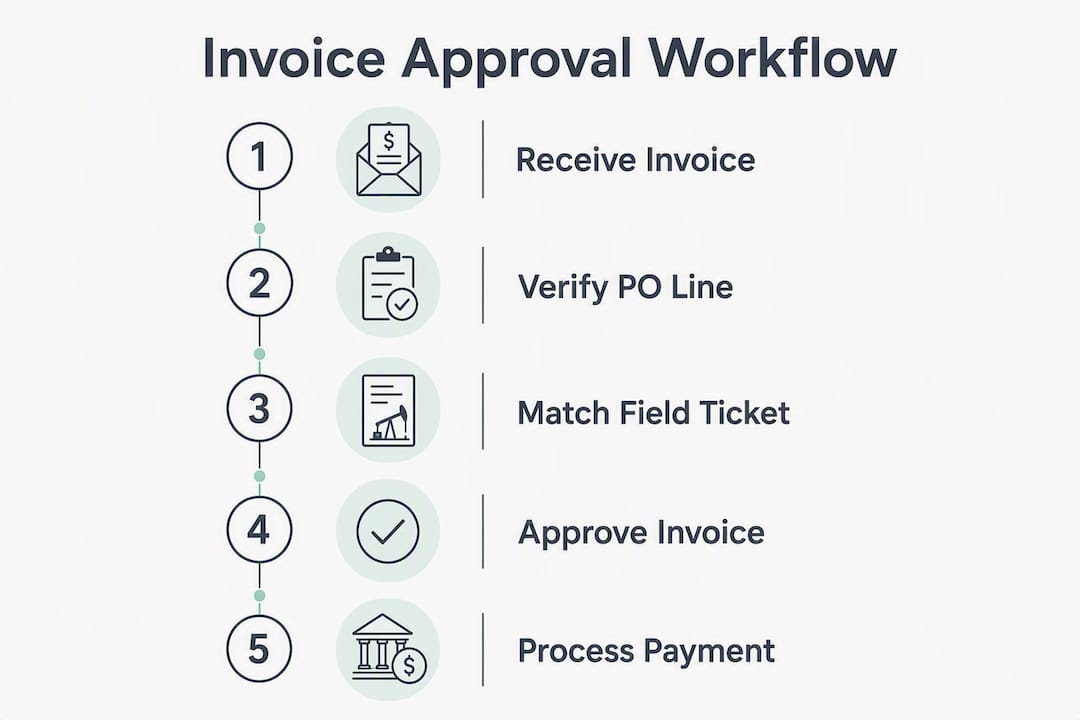
- Intake and capture. All invoices enter through one channel. OCR or AI extraction pulls header and line-item data into the system without manual keying.
- Coding to well/AFE/cost code. AP staff assign the GL account, well identifier, and AFE number before the invoice moves forward. Approvers confirm the coding, not just the dollar amount.
- Three-way line-item matching. The system compares invoice lines against the PO and the field ticket or goods receipt at the unit price and quantity level. Line-level matching catches subtle variances that footer-total matching misses entirely.
- Rules-based routing. The approval matrix routes by amount, GL code, cost code, and entity. Invoices below a defined threshold with a clean match can auto-approve (touchless processing). Non-PO invoices follow a separate sub-flow with mandatory justification fields and higher approval thresholds.
- Approval with timestamped rationale. The approver reviews the invoice, the matched PO lines, and the field ticket inside the approval notification. If they have to leave the tool to find context, the workflow is already broken.
- Exception handling. Missing PO, quantity or price variance outside tolerance, no goods receipt, or a vendor bank change each trigger a documented exception path with a defined resolution SLA.
- Posting to ERP. Approved invoices post automatically. The audit trail captures who approved, when, and what changed.
Pro Tip: Surface the original PO line items and the field ticket details directly inside the approval notification. Approvers in the field should never need to open a second system to confirm what was ordered and delivered.
Automation catches exceptions before they reach approvers. Best-in-class AP teams hold exceptions to under 10% of total invoice volume. When exceptions are the majority, the problem is upstream: missing PO references, inconsistent vendor master data, or invoices arriving without required fields.
What controls and software features do operators need?
An invoice approval workflow is a control system, not a signature step. The approval record must be a permanent, timestamped audit trail that documents whether spend was authorized, by whom, and why. A detached email approval proves nothing to an auditor.
The feature checklist for any invoice approval system software an operator evaluates:
- Single intake channel with duplicate detection on arrival
- OCR/AI data capture at header and line-item level
- Configurable approval matrix by amount, GL, cost code, AFE, and legal entity
- Backup approvers and auto-escalation timers with documented SLA thresholds
- Segregation of duties enforced by role-based access controls
- Immutable timestamped audit trail for every action, including rejections and coding changes
- ERP sync so approved invoices post without manual re-entry
- Vendor master change controls requiring out-of-band verification before a bank account update takes effect
- Duplicate invoice detection across invoice number, vendor, amount, and date
Manual invoice processing can cost as much as $16 per invoice. Automation reduces that cost materially, but the bigger gain for upstream operators is control quality: per-well traceability, who-approved-what evidence, and a defensible audit record.
How do you roll out an invoice approval workflow in 4–6 weeks?
A phased pilot starting with your top 20 suppliers dramatically reduces rollout risk and gets you to measurable results fast.
| Week | Milestone |
|---|---|
| 1 | Map current state: document invoice sources, routing gaps, and exception types |
| 2 | Define approval policy: document DOA by role, amount, GL, and AFE |
| 3 | Configure single intake channel and connect to invoice approval system software |
| 4 | Pilot with top 20 suppliers; configure routing rules by well and cost code |
| 5 | Adjust tolerance rules; validate ERP sync and audit trail |
| 6 | Go-live; activate escalation timers and backup approver assignments |
Onboarding checklist before go-live:
- Map delegation of authority (DOA) to AFE and cost code structure
- Configure routing rules by well, GL, and entity
- Define SLA windows and escalation timers for each approval tier
- Train approvers on in-system context (PO lines, field tickets, vendor history)
- Document exception paths and resolution SOPs inside the system
- Validate KPIs during pilot: touchless rate, average approval time, exception rate, and invoices outside SLA
What pitfalls should operators watch for?
Treating invoice approval as a signature step rather than a control is the most expensive mistake an independent operator can make. When the approval record lives in an email thread instead of the invoice system, you have a signature. You do not have a control.
| Pitfall | Fix |
|---|---|
| Routing by department, not by well/AFE | Reconfigure routing rules to use cost code and AFE as primary routing keys |
| Signature-only approvals with no system record | Require in-system approval tied to the invoice image with a timestamp |
| No backup approver configured | Assign a backup for every approver tier; set escalation timers |
| Approvers lack PO and field ticket context | Surface PO lines and field ticket details inside the approval notification |
| Non-PO invoices follow the same low-touch path as matched PO invoices | Create a separate sub-flow with justification fields and higher thresholds |
Backup approvers and escalation timers are not optional features. Without them, a single approver’s absence can stall vendor payments, damage relationships, and distort month-end accruals.
Which metrics prove your workflow is actually working?
| KPI | Definition | Target |
|---|---|---|
| Average approval cycle time | Days from invoice receipt to approved status | Under 3 days |
| Touchless rate | % of invoices auto-approved without manual intervention | 40–60% for mature workflows |
| Exception rate | % of invoices flagged before reaching an approver | Under 10% |
| Per-well expense variance | Actual vs. budgeted cost by well/AFE | Tracked monthly |
| Time-to-post to ERP | Hours from approval to ERP posting | Same business day |
| Duplicate detection rate | % of duplicate invoices caught before payment | 100% |
Dashboard fields worth tracking: approval pipeline by approver (aging), exceptions by vendor, invoices outside SLA by AFE, and touchless rate trend by month. A controller who can see aging by AFE in real time can intervene before a bottleneck becomes a missed payment.
How does Wellsmanager address these needs for upstream operators?
Wellsmanager is built specifically for upstream operations, and its invoice management workflow capabilities align directly with the control requirements above:
- Per-well P&L tagging on every invoice, so costs post to the correct well and AFE without manual reconciliation
- PO and field ticket context surfaced inside approvals, so approvers never leave the platform to verify what was ordered or delivered
- Configurable routing by AFE, cost code, and entity, with backup approvers and escalation timers built in
- Immutable timestamped audit trail capturing every approval, rejection, coding change, and escalation
- ERP sync for real-time posting once an invoice clears the approval matrix
- AI-generated executive briefs that surface per-well expense variance and approval pipeline status without manual reporting
Operators who move from spreadsheet-based routing to Wellsmanager’s platform typically see fewer misallocated expenses at month-end, cleaner audit records, and more predictable vendor payment cycles. The per-well P&L view means a controller can close the month with confidence rather than spending days reconciling field tickets to ledger entries.
Key Takeaways
A well-designed invoice approval workflow routes by AFE and well code, enforces three-way line-item matching, and captures a permanent timestamped audit trail at every step.
| Point | Details |
|---|---|
| Route by well/AFE, not department | Routing by cost code ensures expenses post to the correct well P&L in real time. |
| Enforce three-way line-item matching | Compare unit price and quantity at the line level; footer-total matching misses subtle vendor variances. |
| Build escalation timers and backups | Without auto-escalation, invoices stall in personal inboxes and distort month-end accruals. |
| Measure touchless rate and cycle time | Target a fast average approval time and a substantial touchless rate for mature workflows. |
| Wellsmanager as your next step | Wellsmanager’s per-well P&L tagging, in-approval field ticket context, and audit trail are built for upstream operators; start a 4–6 week pilot with your top 20 suppliers. |
The approval workflow most operators have is not actually a control
The gap between “we have an approval process” and “we have a control system” is wider than most independent operators realize. An email thread with a CFO reply is not an audit trail. A spreadsheet routing log is not segregation of duties. The evidence that matters to an auditor, a bank, or a working interest partner is a system record: timestamped, tied to the invoice image, and immutable.
The change management piece is underrated. Configuring the right routing rules takes a week. Getting field supervisors and operations managers to approve inside the system rather than replying to emails takes longer. Documented SOPs built into the workflow itself, with in-screen guidance at each decision point, are what preserve the control after staff turnover. A workflow that depends on one person knowing the process is not a workflow. It is a single point of failure.
Per-well invoice control, without the spreadsheet archaeology
Independent operators spend real time every month reconciling field tickets to ledger entries because their approval process was never designed to capture per-well cost data at the point of approval. Wellsmanager solves that at the source: every invoice approval is tagged to a well and AFE, PO lines and field tickets surface inside the approval notification, and the audit trail writes itself.
The result is a month-end close that takes hours instead of days, an audit record that holds up to scrutiny, and vendor payment cycles your suppliers can actually plan around. If you are running approvals through email threads or shared inboxes today, the path to a defensible, field-ready control system is a 4–6 week pilot with your top 20 suppliers. Request access to Wellsmanager, and see how the per-well approval workflow works for your operation.
Useful sources and further reading
- Invoice Approval Workflows: How to Design Routing That Stops Stuck Invoices — Corpay’s practical guide to routing design, approval matrices, and processing cost benchmarks. Used in the controls, metrics, and rollout sections.
- What Is an Invoice Approval Workflow in Accounts Payable? — Covers audit trail requirements, the control-vs-signature distinction, and approver context needs. Used in the BLUF definition, controls, and pitfalls sections.
- Invoice Approval Workflow: A Practical Guide for AP Teams — Focuses on backup approvers, escalation timers, and non-PO sub-flows. Used in core steps, pitfalls, and implementation checklist.
- Supplier Invoice Approval Workflow: 2026 Design — Details line-item matching requirements and the phased 4–6 week pilot approach. Used in core steps and the rollout timeline table.
- You Need an Automated Invoice Approval Workflow, Here’s Why — Explains the operational drawbacks of paper-based processes and the case for automation. Useful background for operators evaluating the transition.
- Invoice Approval: How the Process Works and Why It Breaks Down — Covers delegation of authority, exception handling, and the step-by-step build of an approval process. Useful for operators designing their DOA policy.