Independent Operators: Oilfield Software Rollout for the Three Jobs

The rollout approach that works for independent operators is a bounded pilot, run on one lease or one crew, that proves adoption and moves a real operational number before you scale. Give it 60 to 90 days for the pilot phase. Judge it on two things: are field hands actually logging tickets in the app instead of a notebook, and did a measurable KPI move, like days to close the cost book or hours to reconcile well costs. Everything else in this guide is the checklist and phase plan to get there.
TL;DR:
- Data cleansing and integration checks are crucial before cutover, with mismatched well or lease names causing most delays.
- A phased rollout on a limited scope helps identify data and workflow issues early, with most operators aiming for 80% ticket logging adoption.
- Short, role-based micro-training and peer champions drive faster system adoption in field crews, rather than lengthy classroom sessions.
- System acceptance tests should include real scenarios and exception handling to verify operational readiness before full launch.
- Key KPIs such as adoption rate, days to close the cost book, and LOS turnaround must improve within 90 days to confirm successful deployment.
Table of Contents
- What Should Be On Your Software Rollout Oilfield Checklist?
- How Do You Run a Pilot Before You Scale Company-Wide?
- What Integration and Data Work Has to Happen Before Cutover?
- What Gets Field Crews to Actually Use the New System?
- What Should You Test Before You Flip the Switch?
- How Do You Know the Rollout Actually Worked?
- What Trips Up Most Oilfield Software Rollouts?
- How Does WellsManager Fit These Three Operator Jobs?
- An Operator’s Take On What Actually Moves the Needle
- A Simpler Way to Handle the Three Jobs That Matter Most
- Sources
- FAQ
What Should Be On Your Software Rollout Oilfield Checklist?
Before you sign a contract or schedule a kickoff call, get this on one page. Most oilfield software deployments don’t fail because the tool is bad. They fail because nobody wrote down who owns what before day one.
Start with scope. Pick one pumper route, one field office, or one basin. Name a sponsor who can make decisions without a committee vote, and write down what “success” looks like in numbers, not adjectives.
Pro Tip: If you can’t name the person who owns the pilot in one sentence, you don’t have a pilot yet. You have a hope.
Here’s the one-page version:
- Pilot scope defined by lease, crew, or basin, with a named owner and executive sponsor
- Data readiness check: well list, lease names, and vendor list match across every system before cutover
- Sample sign-off test: pull 10 field tickets and 10 well costs and confirm they reconcile against your current process
- Digital champions named per crew, with role-based training under 30 minutes per module
- Go/no-go criteria written down before testing starts, not decided in the hallway afterward
- First 30/60/90 day hypercare tasks assigned to a real person, not “the team”
- Three KPIs tracked from day one: ticket adoption rate, days to close the cost book, LOS turnaround time
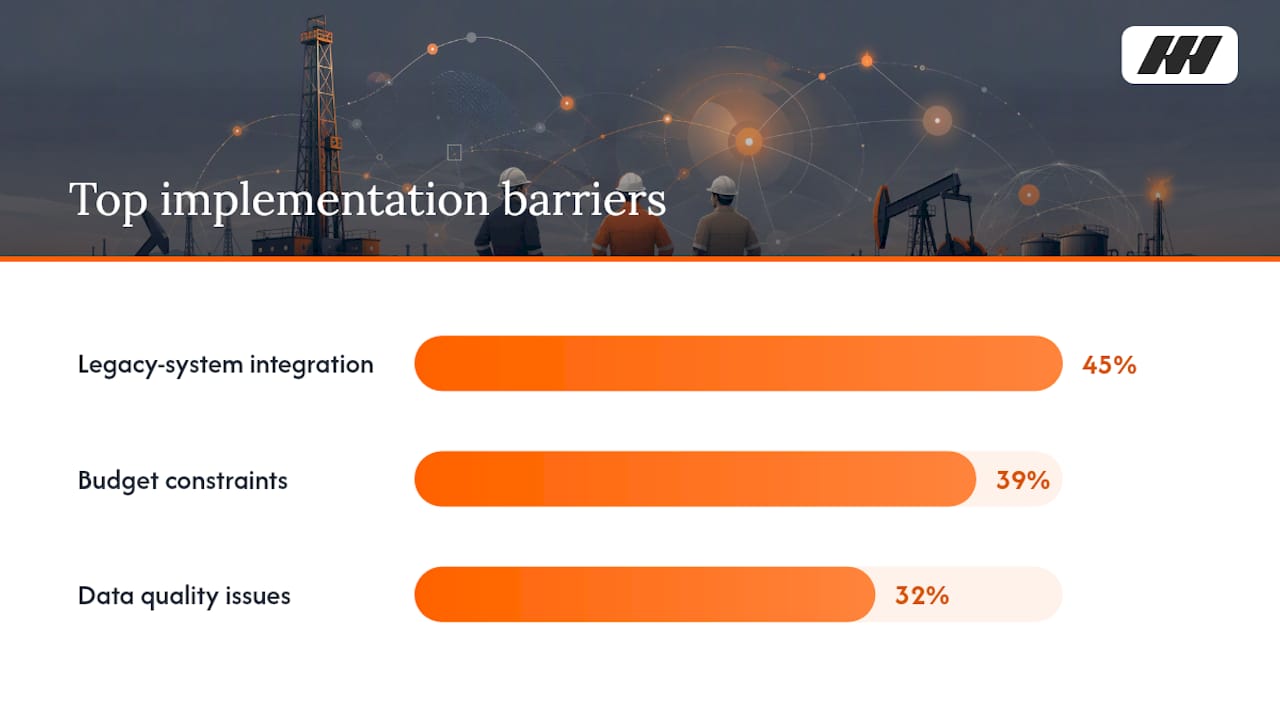
Integration failures cause more stalled rollouts than any other single factor. EY’s upstream digital survey found 45% of operators cite legacy-system integration as their top implementation barrier, ahead of budget at 39% and data quality at 32%. That’s why the checklist leads with data and integration checks, not training.
How Do You Run a Pilot Before You Scale Company-Wide?
A phased rollout beats a company-wide flip every time, because it lets you catch data problems while the blast radius is small. Validere’s implementation guidance recommends starting with a clearly bounded first phase and expanding only after the workflow, data, and support model all check out. Here’s how that breaks down in practice.
- Phase 0, discovery (1 to 2 weeks). Name the owners for field data, well costs, and investor reporting. Pull sample workflows from your current process, notebook, spreadsheet, or group text, and define the two or three KPIs you’ll track. Check that your well and lease names are consistent across every source system.
- Phase 1, bounded pilot (30 to 60 days). Limit scope to one crew, one lease group, or one basin. Validere’s guidance points to this kind of bounded scope, one workflow across a limited set of sites, as the fastest way to preserve what you learn without dragging every field hand and every integration into the first swing. Small-crew rollouts on a single mobile module can run in as little as a few days for basic ticketing, but a full pilot covering tickets, costs, and investor reporting typically needs the full 30 to 60 days to surface real problems.
- Phase 2, expand by basin or module (60 to 90 days after pilot sign-off). Once the pilot clears its decision gate, add the next basin or the next module. Expect the second rollout to move 30 to 40% faster than the first, since you’ve already fixed your data mapping and trained your first wave of champions.
Decision gates matter more than calendar dates. Don’t move to Phase 2 until you hit a minimum adoption threshold (most operators target 80% of field staff actively logging tickets), your data quality checks pass on a sample reconciliation, and your target operational KPI, LOS turnaround or cost book close time, has actually moved in the right direction.
What Integration and Data Work Has to Happen Before Cutover?
The technical work that gets skipped is almost always data cleansing, and it’s almost always the reason a rollout drags into month four instead of finishing in month two. Treat it as its own funded, staffed subproject with sample-based acceptance tests not a task line inside the bigger project plan.
Start with canonical mapping. Every well, lease, and vendor name needs one agreed spelling across your old system and the new one, because mismatched names are the single most common cause of a broken cost book at cutover. If your notebook says “Smith 12H” and your accounting spreadsheet says “Smith #12,” pick one and fix every record before go-live, not after.
Sequence your integrations from read-only to read-write. Pull data feeds in first, confirm they display correctly, and only then turn on writeback so the new system can push data out to whatever you’re keeping. This order catches mapping errors before they can corrupt a live record. Barriers like validation time and technical complexity remain the top reasons digital projects stall in oil and gas, according to a hybrid framework study on transformation barriers, which is exactly why protecting the validation window matters more than hitting an arbitrary launch date.
Here’s what to verify before cutover:
- Well and lease name mapping matches across every system, no exceptions
- A sample of 20 to 30 historical field tickets and well costs reconciles cleanly against the new system’s output
- Vendor and AFE reference data is current, not a six-month-old export
- Offline sync works in the field, since a lot of Permian lease roads still don’t have reliable signal, and a ticket entered offline needs to sync correctly once the crew truck gets back to coverage
What Gets Field Crews to Actually Use the New System?
Adoption lives or dies on whether the app is faster than the notebook, not on how many training sessions you scheduled. Research on technology adoption in upstream operations consistently points to trust and in-field habit, not classroom hours, as the deciding factor, according to a study on technology adoption barriers in oil and gas.
Role-based micro-training beats a one-size-fits-all session every time. A pumper needs five minutes on how to log a field ticket. A field supervisor needs fifteen minutes on approvals. Nobody needs a two-hour classroom walkthrough of features they’ll never touch.
Pro Tip: Put your best pumper on the pilot crew and make them the digital champion. Field hands trust a peer who’s already fighting the same dirt roads and bad signal, not a rep from the vendor.
Watch these adoption signals weekly, not monthly:
- Daily and weekly active users against your total field headcount
- Task completion rate: tickets logged same-day versus tickets logged three days late
- Reversion rate: how many crews are still keeping a paper backup “just in case”
- Time from field entry to office visibility
Short feedback loops accelerate everything. If a pumper flags that a field ticket form has too many required fields, fix it that week, not next quarter. Leadership sponsorship means the district manager actually asks about adoption numbers in the Monday meeting, not just the software vendor.
What Should You Test Before You Flip the Switch?
Go-live readiness comes down to one question: can the business actually run on this system during a real operational cycle, not just during a demo. Operational readiness guidance from SHALE Magazine argues that readiness questions, “are we ready to run the business,” should drive the go/no-go call instead of a raw defect count.
Run three layers of testing, each with a different owner:
- System integration testing (SIT). Your software vendor’s technical team confirms that data feeds move correctly between systems. This catches broken connectors before anyone touches real well data.
- User acceptance testing (UAT). Your field supervisors and office staff run real scenarios, logging a field ticket, reconciling a well cost, generating a lease operating statement, and confirm the output matches what they expect.
- Integrated operational testing. Run a full month-end cycle inside the new system while your old process still runs in parallel. This is the layer most rollouts skip to save time, and it’s the layer that predicts go-live success more reliably than any other test.
Script for exception cases, not just the happy path. What happens when a field ticket comes in three days late? When a vendor invoice doesn’t match the AFE? When an investor distribution needs a mid-month correction? A study on digital transformation barriers found that time-consuming validation and technical complexity remain top obstacles, so protect the testing window rather than compressing it to hit a launch date.
Staff hypercare for the first four weeks with someone who can answer a field call in under an hour. Triage incidents by whether they block a work ticket or a payment first, everything else second.
How Do You Know the Rollout Actually Worked?
The KPIs that matter split into three buckets: adoption, data quality, and operational speed. Track all three from week one, because a rollout that hits 90% adoption but never speeds up your LOS close hasn’t delivered value yet.
Adoption KPIs come first: active users against total field headcount, and workflow completion rate, meaning tickets logged the same day work happens, not three days later from memory.
Data quality indicators come next: how many records need manual correction each week, and whether well and lease names still match across systems after the second month.
Operational KPIs are the ones that justify the spend to your investors: days to close production accounting, hours to resolve a field work ticket dispute, and whether you can see per-well expense visibility without waiting on a spreadsheet from the office.
Build a short executive readout for Day 30, 60, and 90. EY’s research found operators who tie digital investment to measurable outcomes report an average value gain of $2.80 for every dollar spent, a strong argument for tying your Phase 2 funding request to the KPI movement you can actually show, not a feature list.
- Adoption rate and workflow completion, week over week
- Data quality corrections needed per week
- Days to close the cost book and LOS turnaround
- Per-well expense visibility, measured by how fast an owner can pull it
Use the trend, not the snapshot, to decide what to reconfigure. If adoption stalls at 60%, the fix is usually a workflow that’s too many taps, not a training problem.
What Trips Up Most Oilfield Software Rollouts?
Most failures trace back to four repeatable mistakes, and every one of them has a cheap fix if you catch it early.
Treating the rollout as a technology install instead of a change management project is the biggest one. The fix is naming a sponsor and digital champions before you sign the contract, not after adoption stalls.
Cutting the integrated testing window short to hit a launch date is the second. Protect that window and run real scenarios, including exception cases, the way readiness guidance recommends, rather than compressing it.
Underfunding data cleansing is the third, and it’s the one that quietly adds a month to every timeline. Budget it and staff it as its own subproject with sample acceptance tests, not a bullet point buried in the main plan.
- Classroom-only training that never touches the field is the fourth. Fix it with in-field micro-training and a peer champion on every crew, not a one-time webinar nobody remembers by week three.
How Does WellsManager Fit These Three Operator Jobs?
A rollout only matters if it moves the numbers you actually manage day to day. WellsManager is built around three of them, and nothing else.
- Field work tickets: replaces the notebook and the group text with a logged record of well work and costs your crew can enter from the truck.
- Well cost book: shows what each well actually spent, so the cost-tracking KPI in your rollout plan has a real system behind it instead of a spreadsheet reconciled by hand.
- Investor checks and lease operating statements: gets partners paid without a month-end scramble, which is the operational KPI most operators care most about proving.
Implementation follows the same pattern this guide lays out: a bounded pilot scope, a named champion per crew, and a short hypercare window rather than an open-ended support queue. This software doesn’t do ERP, production gauging, or JIB accounting, and it’s not trying to. It sticks to the three jobs above, which keeps the rollout scope small enough to actually finish.
An Operator’s Take On What Actually Moves the Needle
I’ve watched crews keep a paper backup for six months after “go-live” because nobody made the app faster than the notebook. That’s the whole game. Sponsor, digital champion, bounded pilot. Skip any one of the three and you’re just buying software nobody opens.
First week after go-live, don’t chase every bug report. Chase the ticket that didn’t get logged. That’s the one telling you the truth.
*— Pedro
A Simpler Way to Handle the Three Jobs That Matter Most
Most rollout guides try to solve everything at once, tickets, gauging, accounting, compliance, and end up solving nothing well. WellsManager takes the opposite bet: field work tickets, a per-well cost book, and investor checks with a lease operating statement, and nothing else competing for your team’s attention during the pilot. That focus is exactly what shortens the adoption curve this guide walks through, because crews aren’t learning five modules to get one job done.
An independent operator running a 60-day pilot on one lease group can expect the same pattern outlined above: a named champion, a short hypercare window, and a cost book that finally matches what the field actually logged. If you’re planning a rollout for 2026, start with a scoped conversation about your lease count and crew size at Wellsmanager and see whether the pilot math works for your operation.
Sources
- Seizing the digital opportunity in upstream oil and gas — EY (2026)
- Hybrid framework for investigating digital transformation barriers in the oil and gas sector — MDPI (2024)
- How to implement EHS software — Validere (2026)
FAQ
What Software Do Oil Companies Use?
Independent operators typically run separate tools for field data capture, well cost tracking, and investor reporting, rather than one all-in-one system, since each job has different daily users and different data needs.
What Is Oilfield Automation?
Oilfield automation generally refers to equipment-level systems like SCADA and production gauging, which are separate from the operations software this guide covers, field tickets, well costs, and investor reporting.
What Is the Best ERP Software for Oil and Gas?
ERP selection depends heavily on company size and accounting complexity, and it falls outside the scope of a field-ticket, cost-book, and investor-reporting rollout like the one WellsManager supports.
How Long Does a Software Rollout Oilfield Deployment Take?
A bounded pilot on one crew or lease group typically runs 30 to 60 days, with a full basin-wide expansion following 60 to 90 days after the pilot clears its decision gate.
What KPIs Prove a Rollout Worked?
Track adoption rate among field staff, days to close the cost book, and lease operating statement turnaround time. All three should move within the first 90 days if the rollout is working.