Digital Well Files: 90 Days to Stop File Hunting for Permian Operators
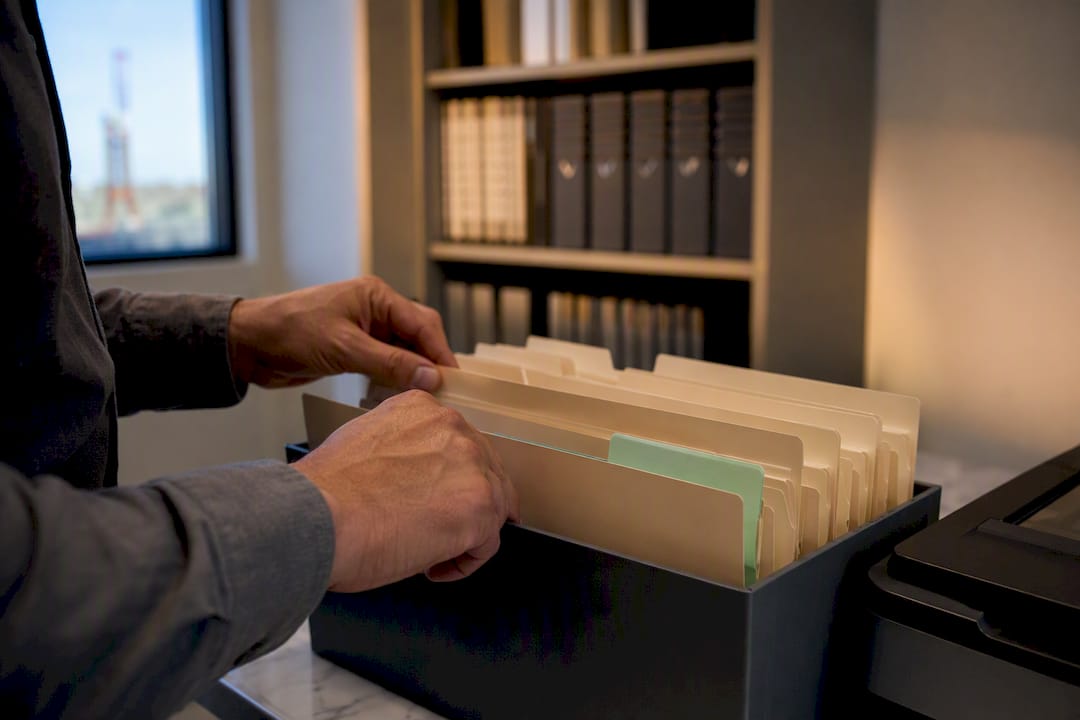
A digital well file is every document tied to a well, drilling reports, completion records, invoices, division orders, stored in one searchable place instead of a filing cabinet or a hard drive somewhere on the third floor. The payoff is speed: field tickets get verified faster, the well cost book team stops fighting missing invoices, and investor checks go out smoothly without a scramble. The first move isn’t buying software; it’s building a scoped inventory of what you already have and picking one place to put it.
TL;DR:
- Building a comprehensive inventory starts with listing all document types and locations before creating a master well list to identify gaps and duplicates.
- Standardizing API numbers to 14 digits with leading zeros and tagging files with consistent metadata ensures accurate linking and effective searchability of well documents.
- Combining full-text search with metadata filters and thumbnails enhances quick retrieval, with OCR and pattern matching improving digitization accuracy of old records.
- Cloud storage paired with indexed catalogs and role-based access controls provides secure, scalable, and easily recoverable well file management.
- Using industry-standard formats like LAS for logs, CSV for tabular data, and indexed PDFs for original documents simplifies sharing, processing, and compliance.
Table of Contents
- How Do You Collect Every Well Document Into One Place?
- What Metadata Fields Make a Well File Actually Findable?
- How Do You Make Well Documents Searchable Instead of Just Stored?
- What’s the Right Way to Scan and Extract Data From Old Well Records?
- Cloud Storage or Legacy Drives: What Actually Works?
- How Do You Stop Well Identifiers From Turning Into a Mess?
- What Do Field Tickets, Cost Books, and Investor Reports Look Like With This System?
- What File Formats Should You Hand Off for Analysis or Reporting?
- Who Should Have Access to Digital Well Files, and How Do You Keep Them Secure?
- What Happens to Your Well Files if a Drive Fails or an Office Floods?
- How Do You Track Changes and Versions in Well Files Over Time?
- Can Digital Well Files Connect to the Other Software You Already Use?
- Are There Industry Standards for Digitizing Well Records?
- Pedro’s 90-Day Plan for Cutting Search Time
- How Wellsmanager Ties Your Well Files to the Work That Matters
- Sources
- FAQ
How Do You Collect Every Well Document Into One Place?
Most operators don’t have a digital well file problem. They have a “I know it’s somewhere” problem. Files live on a field manager’s laptop, in a vendor’s email attachment, in a banker’s box from a well you bought in 2014, and in three different shared drives that nobody fully trusts. Industry reporting ties this scatter, plus inconsistent file naming, directly to the hours operators lose hunting for basic records before they can even start real work.
Here’s a workable sequence for building your first inventory:
- List document types first. Drilling reports, completion reports, workover records, division orders, title opinions, lease agreements, invoices, and regulatory filings.
- Name every location. Shared drives, vendor portals, pumper trucks, accounting software attachments, and physical boxes in storage.
- Pull one master list per well, not per document type, so you can see gaps well by well.
- Triage duplicates. When two copies exist, keep the one with a visible date and signature, and flag the rest for review instead of deleting them outright.
- Build an ingest queue — a simple spreadsheet with columns for well name, API number, document type, source location, and status (found, missing, digitized).
That spreadsheet is ugly. It also beats a filing cabinet every time.
What Metadata Fields Make a Well File Actually Findable?
A scanned PDF with no metadata is just a picture of paper. It doesn’t help your field crew or your accounting lead unless it’s tagged the same way every time.
Your minimum metadata set should cover:
- Normalized API number (14 digits, leading zeros intact — this is the anchor that ties a document to the right well, not a nearby one with a similar name)
- Canonical well name as it appears on your master well list, not whatever the vendor called it
- Document type, pulled from a short controlled list (drilling report, invoice, division order, and so on) rather than free text
- Document date, which matters enormously for cost book reconciliation by month
- Source or vendor name, so you can trace back if something looks wrong
API number formatting errors are the most common failure point. A vendor drops the leading zeros, or truncates to 10 digits when your system expects 14, and suddenly that invoice attaches to the wrong lease. Wellsmanager’s own guide to API number formatting walks through the exact digit patterns to standardize on.
Pro Tip: Build your folder structure around well name and API number first, document type second. Crews search by well, not by category.
How Do You Make Well Documents Searchable Instead of Just Stored?
Storage without an index is a junk drawer with better locks. Metadata tags tell you what a document is; full-text search tells you what’s inside it. Combine both, and your field team searches a well file the way they’d search Google, not the way they’d dig through a filing cabinet drawer by drawer. Industry coverage on unstructured well data points to exactly this combination as the difference between a fast decision and a stalled one.
Filters matter more than fancy design. The four your team will use constantly:
- Well name or API number
- Document date range
- Document type
- Vendor or source
Preview matters too. Nobody wants to download a 40 page PDF to confirm it’s the right completion report. A thumbnail preview with the first page visible saves real time, and a map view that lets someone click a well location to pull its file folder works well for teams juggling dozens of leases across Midland and Odessa acreage.
What’s the Right Way to Scan and Extract Data From Old Well Records?
Old paper records need a workflow, not a scanner and good intentions. Scan at 300 DPI minimum, color for anything with handwritten notes or stamps, black and white is fine for clean typed reports. Name files consistently at the point of scanning (API number plus document type plus date) so you’re not renaming a thousand files later. Keep the physical original if it has a wet signature or notarization; digitize it, but don’t throw it away.
The processing steps that actually work:
- Run OCR on image-based PDFs to convert scanned pages into searchable text.
- Extract key fields — API number, depth, and dates — using pattern matching or automated tools.
- Route low-confidence extractions to manual review rather than trusting every result blindly.
- Standardize outputs into LAS or CSV for anything log-related, per the multistep digitization workflow that log digitization specialists follow.
A combined OCR and large language model workflow tested on historical well records hit near-100% accuracy on clean, typed, text-based reports. Accuracy dropped noticeably on scanned records with handwriting or stamps. That gap is exactly why acceptance criteria matter: set an OCR confidence threshold, require key fields to be present, and send anything below that bar to a human before it enters your system.
Cloud Storage or Legacy Drives: What Actually Works?
An S-drive full of folders isn’t wrong, it’s just slow, and it gets slower every year as more people leave the company without documenting where they put things. A cloud object store paired with an indexed catalog solves the findability problem, but only if someone owns the tagging discipline.
- Cloud plus index: faster search, works from the field, easier to back up, costs a monthly fee.
- Legacy shared drives: no extra cost, but search means opening folders one at a time and hoping.
- Access roles: field staff need read access to their assigned wells; accounting needs read access to everything tied to cost and invoicing; only a small admin group should have delete rights.
- Retention: keep everything tied to an active well indefinitely, and don’t purge anything until you’ve confirmed it’s not needed for an investor audit or a sale.
- Acquisition checklist: when you buy a well, ingest the seller’s files into your system within the first 30 days, before institutional memory about “where things are” walks out the door with the seller’s staff.
How Do You Stop Well Identifiers From Turning Into a Mess?
Every operator eventually runs into the same wall: the accounting system calls a well one name, the state calls it another, and the field crew has a nickname for it that matches neither. A master well table fixes this without requiring you to buy a master data management platform. The pattern is simple: build one central table with a surrogate key, then link every source system’s record to that key through a per-source mapping table.
Matching happens in tiers:
- Tier one: exact API number match, normalized to 14 digits.
- Tier two: fuzzy match on well name plus township and range, for records with a missing or damaged API.
- Tier three: manual review queue for anything that doesn’t clear tiers one or two.
Assign a named owner for the well master list, another for working interest records, and another for production allocation. Data quality problems in upstream operations tend to persist for years specifically because no one owns the fix. Once identifiers are consistent, well cost book reconciliation stops being a monthly guessing game.
Pro Tip: Don’t try to fix every historical well at once. Start the master table with your active wells, then backfill acquired properties as time allows.
What Do Field Tickets, Cost Books, and Investor Reports Look Like With This System?
Three quick workflows show what changes once files are centralized and tagged.
- Field ticket pre-dispatch check. Before a crew rolls out, someone pulls the well’s file folder and confirms the required permits and prior work orders are attached. No more discovering a missing permit after the truck is already on location.
- Cost book auto-linking. Invoices and service reports get tagged with well name, API number, and month at intake. The cost book then pulls matching documents automatically instead of someone manually hunting down which invoice belongs to which well.
- Investor packet assembly at quarter close. Pull the indexed documents for the reporting period, run a reconciliation checklist against the lease operating statement, and assemble the packet in a fraction of the time a manual search would take.
None of this requires new headcount. It requires files that are tagged consistently the first time, so retrieval doesn’t depend on someone’s memory.
What File Formats Should You Hand Off for Analysis or Reporting?
Not every well document should stay a static PDF forever. Some need to become structured data that other tools can actually read, and knowing which format fits which use case saves a lot of rework later.
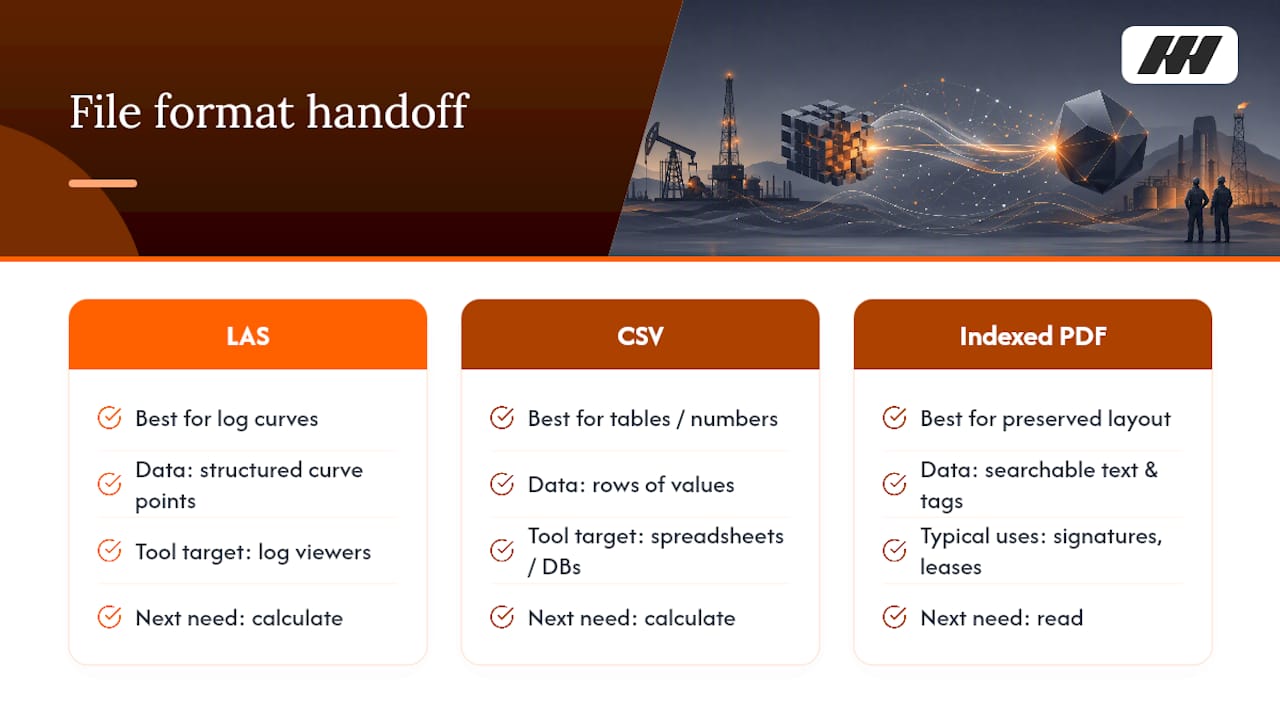
LAS files are the standard for well log curves. If you’re digitizing old geophysical logs, the best-practice digitization workflow ends with LAS output specifically because petrophysical software and log viewers expect that format. Don’t hand a geologist a scanned image of a log curve when a proper LAS file lets them actually work with the data.
CSV files work best for tabular data pulled out of reports: production numbers, cost line items, extracted metadata fields you’re feeding into a spreadsheet or a database. CSV is the lowest common denominator. Almost every accounting and reporting tool can ingest it without a fight.
Indexed PDFs remain the right format for anything that needs to preserve its original layout and signatures, division orders, title opinions, regulatory filings, and lease agreements. The “indexed” part matters as much as the PDF itself. A PDF with searchable text and metadata tags attached is a completely different tool than a flat scanned image with the same file extension.
The handoff decision comes down to one question: does the next person need to read this document, or does the next system need to calculate with it? Reading favors indexed PDFs. Calculating favors LAS or CSV. Most well files need a mix of all three, and forcing everything into one format usually means someone downstream has to convert it back manually, which defeats the purpose of digitizing it in the first place.
Who Should Have Access to Digital Well Files, and How Do You Keep Them Secure?
Well files contain information you don’t want floating around casually: working interest percentages, lease terms, division order details, and sometimes personal information tied to royalty owners. Security here isn’t about exotic threats. It’s about basic access discipline that most operators skip because it feels like overhead until the day it isn’t.
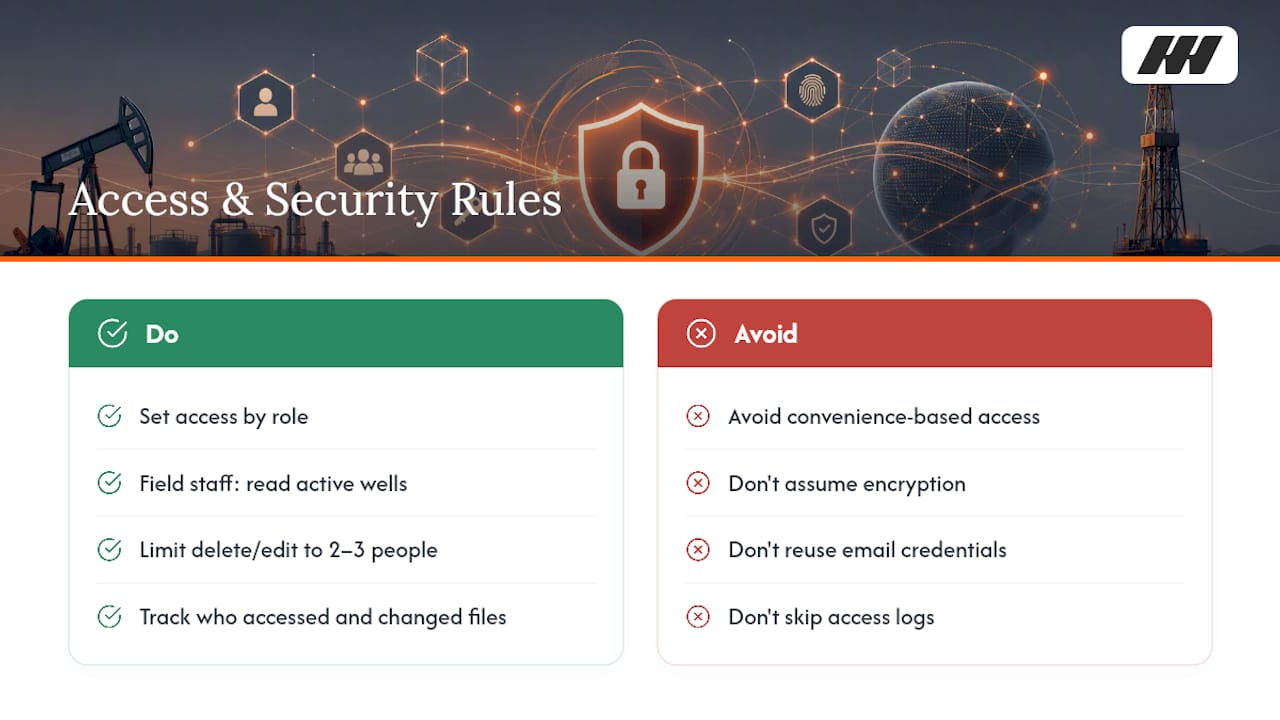
Set access by role, not by convenience. Field staff need read access to documents for wells they’re actively working. Accounting needs broader read access across cost and invoicing documents but doesn’t need edit rights on regulatory filings. A small group, usually two or three people, should hold delete or permanent-edit permissions. Everyone else works with a copy or a read-only view.
Track who accessed or changed a document and when. This isn’t about distrust. It’s about being able to answer a simple question during an audit or a dispute: who touched this file, and what did they change? A system with no access log leaves you guessing, and guessing during a title dispute or an investor audit is a bad place to be.
Encrypt files in transit and at rest if you’re using any cloud storage, which most reputable providers do by default. Confirm it rather than assuming it. And separate your well file system’s login credentials from your general email and file sharing logins. A compromised email account shouldn’t automatically mean compromised well records.
Compliance requirements vary depending on what’s in the file. Royalty owner personal information carries different handling expectations than a drilling report. When in doubt, treat anything with a name, address, or financial detail attached to an individual with the same care you’d want your own information handled.
What Happens to Your Well Files if a Drive Fails or an Office Floods?
Odessa summers bring dust storms. Midland gets the occasional flash flood that turns a parking lot into a lake. Neither is rare enough to ignore when you’re deciding where your only copy of a title opinion lives.
The rule that matters most: no single location should hold the only copy of anything. A local server plus a cloud backup beats a local server alone. A cloud storage provider plus a secondary backup, even a basic export to a second cloud account, beats trusting one vendor’s uptime promises completely.
Test your backup, don’t just assume it works. Pull a random file from the backup copy once a quarter and confirm it opens and matches the original. Operators discover a broken backup process most often during the exact moment they need it, which is the worst possible time to find out.
Set a recovery time expectation for yourself. If your office lost power and internet for three days, how long could your team function without access to well files? If the honest answer is “we couldn’t,” that’s the signal to prioritize a cloud backup over almost anything else on this list. Physical records deserve the same thought: a fireproof box for original signed documents, stored somewhere other than the building where you keep everything else.
How Do You Track Changes and Versions in Well Files Over Time?
Documents change. A division order gets amended. A completion report gets corrected after a data entry error is caught. Without version control, you end up with three files named roughly the same thing and no way to tell which one is current.
Every document needs a clear version marker, either in the filename itself or in the metadata tag, not both inconsistently. A simple version number or date stamp appended to the file record works better than relying on “modified date” alone, since that field changes any time someone opens and resaves a file without actually editing it.
Keep prior versions instead of overwriting them. Storage is cheap. The ability to show what a lease agreement said six months ago, before an amendment, is not something you want to lose because someone hit save on the wrong file. Most cloud storage systems retain version history automatically. Confirm yours does, and confirm someone knows how to pull an old version when it matters.
Log who made the change and roughly why, even a one-line note attached to the update. “Corrected API number, was transposed” takes ten seconds to write and saves someone else an hour of confusion later.
Can Digital Well Files Connect to the Other Software You Already Use?
A well file system that stands completely alone from your other tools ends up as one more place to check instead of a shortcut. The goal is a document repository that talks to the systems tracking costs, production, and investor payouts, not a separate island.
The connection point that matters most is the well identifier. If your well file system, your accounting software, and your reporting tools all reference the same normalized API number, documents can link to financial and operational records automatically instead of requiring someone to manually match them up every month. This is the practical payoff of the master well table approach: once every system points to the same identifier, integration stops being a custom project and starts being a lookup.
Not every well file needs to sync everywhere. Regulatory filings and title documents mostly live in the document system and get referenced, not imported, elsewhere. Cost-related documents, invoices, service tickets, and completion reports benefit the most from linking directly into whatever system produces your well cost book, since that’s where the numbers actually get used.
Avoid building custom integrations before you’ve proven the workflow manually. Tag documents consistently and confirm the linkage makes sense for a handful of wells first. Automating a broken process just makes the mess move faster.
Are There Industry Standards for Digitizing Well Records?
There’s no single universal mandate that every operator follows, but there are established conventions worth adopting rather than reinventing.
For well logs specifically, the standard digitization workflow runs through scanning, preprocessing, curve digitization, and quality control, ending in LAS format output. LAS has been the working standard for log curve data across the industry for decades, and petrophysical software expects it.
API numbering itself follows a well-established national convention: state code, county code, and a unique well sequence number, typically formatted as 10, 12, or 14 digits depending on how much detail is included. Sticking to the 14 digit version with leading zeros preserved gives you the most precision and avoids collision between wells with similar shorter codes.
Scanning resolution has an informal industry norm too: 300 DPI is the common baseline for archival quality, higher for documents with fine handwriting or faded text. There’s no regulatory body enforcing this number, but it’s the point where OCR accuracy and file size both land in a reasonable range.
The honest answer is that “standard” in this space means widely adopted convention more than legal requirement. Following LAS for logs, consistent API formatting, and 300 DPI scanning puts you in line with what most of the industry already does, which matters when you’re handing files to a partner, a buyer, or an investor who expects them in a familiar format.
Pedro’s 90-Day Plan for Cutting Search Time
Week one: inventory your files, pick a small pilot team, and lock in your minimum metadata fields. Assign owners for the well master list and for document tagging. Time how long a search actually takes today, then set a real target, cutting it in half is realistic. Small, cheap wins here, consistent naming, one shared folder, free up hours your team can put back into actual well work instead of file hunting.
— Pedro
How Wellsmanager Ties Your Well Files to the Work That Matters
Wellsmanager isn’t a document warehouse. It’s built around the three jobs that actually eat an independent operator’s week: logging field work and costs instead of chasing a notebook or a group text, keeping a real per-well cost book instead of guessing what a well spent, and getting investor checks and a lease operating statement out the door without a month-end scramble. When a field ticket, an invoice, or a completion report is tagged to the right well, it flows straight into the cost book and the investor packet instead of sitting in a folder waiting to be found. If your Midland or Odessa operation is still hunting for documents every time a partner asks a question, visit Wellsmanager and see how the platform connects your records to the numbers your investors actually see.
Sources
- Managing Well Files And The Unstructured Data Dilemma
- Building a Single Master Well Table Without an MDM Platform - InFocus Data Blog
- Digitizing historical geophysical well logs: Methods, tools, and best practices - GaeaTech
FAQ
What Is a Digital Well File?
A digital well file is the complete set of documents tied to a specific well, drilling reports, invoices, division orders, and permits, stored and tagged in one searchable digital system instead of scattered folders or paper boxes.
How Do I Normalize API Numbers Across Different Documents?
Standardize every API number to 14 digits with leading zeros preserved, and use that field as your primary matching key across all systems, including your well cost book and any digital well files repository.
What’s the Fastest Way to Make Old Paper Well Records Digital?
Scan at 300 DPI or higher, run OCR to make the text searchable, then extract key fields like API number and date, routing anything with low OCR confidence to manual review before it enters your system.
Do I Need Special Software to Manage Digital Well Files?
Not necessarily. A well-organized cloud storage system with consistent metadata tagging can work for smaller operators; a platform like Wellsmanager helps once you need those files linked directly to field tickets, a cost book, and investor reporting.
How Long Should I Keep Digital Well Files?
Keep everything tied to an active well indefinitely, and don’t purge historical records until you’ve confirmed they’re not needed for an investor audit, a title dispute, or a future well sale.