Certificate of Insurance Tracking for Compliance Teams at Scale

The reliable way to handle certificate of insurance tracking at scale is to combine automated collection with decisioning software and a documented, per-vendor audit trail, not a shared drive full of PDFs. Manual spreadsheets hold up fine at a handful of vendors. Once your vendor count crosses roughly 25 to 50, the renewal cadence alone outpaces what one or two people can track reliably. That’s the point to automate collection, review, and renewal monitoring rather than adding headcount. Done right, this shift produces fewer coverage lapses, a defensible record for auditors, and materially lower labor costs. The rest of this guide shows you how to build that process, what to demand from software, and where the real implementation costs hide.
Key Takeaways
Certificate of insurance tracking works reliably at scale only when automated collection, decisioning software, and a documented per-vendor audit trail replace manual spreadsheet review.
| Point | Details |
|---|---|
| Automate past 25 to 50 vendors | Manual spreadsheet tracking breaks down once renewal volume exceeds what one or two staff can monitor. |
| Document decisions, not just documents | An audit-ready record needs reviewer notes and exception rationale, not just a filed PDF. |
| Reduce vendor login friction | No-login, link-based submission channels get faster, more complete vendor responses. |
| Reserve human review for edge cases | Let automation handle routine compliance checks; route claims-made and unusual endorsements to trained reviewers. |
| WellsManager centralizes compliance for operators | Real-time compliance alerts and audit trail data flow directly into the same platform tracking field costs and invoice approvals. |
Table of Contents
- What Is Certificate of Insurance Tracking?
- Why Does Weak COI Tracking Create Business Risk?
- What’s the Right Process for Tracking Insurance Certificates at Scale?
- How Does Manual COI Tracking Compare to Automated Platforms?
- What Should You Look for in Certificate of Insurance Tracking Software?
- What Does Implementation Cost and How Long Does Rollout Take?
- How Should COI Data Integrate With Your Other Systems?
- What Red Flags Signal a COI Program Is About to Fail?
- How Is AI Changing Certificate of Insurance Decisioning?
- How Can You Pilot COI Tracking in 30 Days?
- What Legal and Compliance Rules Govern COI Tracking?
- How Do You Track Multiple Insurance Types Across Vendors?
- How Do You Get Vendors to Take COI Requirements Seriously?
- How Do You Verify a Certificate Is Authentic and Not Fraudulent?
- A Practitioner’s Take on Rolling Out COI Tracking
- How WellsManager Keeps Compliance Visible for Oil and Gas Operators
- Sources
- FAQ
What Is Certificate of Insurance Tracking?
Certificate of insurance tracking is the ongoing process of collecting, verifying, and monitoring the insurance documentation vendors and contractors submit to prove they carry required coverage. It’s not a one-time intake task. A certificate collected in January can lapse in July, and tracking means catching that lapse before a claim exposes the gap.
Every certificate carries fields that determine whether it actually satisfies your contract terms, and reviewers who skim past them are the reason bad coverage slips through:
- Policy type: general liability, workers’ compensation, professional liability, auto, and umbrella each cover different exposures, and a contract usually requires several at once.
- Named insured: the entity on the certificate has to match the vendor you contracted with, not a parent company or a subsidiary with a similar name.
- Per-occurrence and aggregate limits: the per-occurrence figure caps a single claim; the aggregate caps total payouts for the policy period, and a vendor can burn through the aggregate on unrelated claims before your project even starts.
- Effective and expiration dates: these define your actual coverage window, and a certificate issued today can already be set to lapse mid-project.
- Additional insured endorsement: without this, your organization has no direct claim against the vendor’s policy even if you’re named as a certificate holder.
- Waiver of subrogation: this blocks the vendor’s insurer from coming after you to recover a payout, which matters more than most reviewers realize.
- Carrier and policy number: these let you verify the policy exists and hasn’t been altered, which matters increasingly given how easily certificates get doctored.
Why Does Weak COI Tracking Create Business Risk?
A missed expiration doesn’t just create paperwork. It creates real financial exposure the moment something goes wrong on site. If a contractor’s coverage lapsed the week before an incident, your organization can end up absorbing costs that were supposed to sit with their insurer, and that exposure only surfaces after the claim is filed, when it’s too late to fix.
Audit findings follow the same pattern. Regulators and insurers reviewing your vendor files don’t just check whether a certificate exists. They check whether it was current on the date work occurred, whether it met your stated limits, and whether someone documented the review. A folder of PDFs proves you collected documents. It doesn’t prove you verified them, and that distinction is exactly what auditors probe.
The real cost of manual tracking isn’t abstract. One analysis put the annual labor cost of manual COI tracking at roughly $36,000 for a mid-sized vendor portfolio, once you account for the hours spent chasing renewals, re-reading policy language, and following up on incomplete submissions.
Beyond the dollar figure, weak tracking creates operational drag that’s easy to underestimate:
- Accounts payable delays payments to vendors whose compliance status nobody can confirm quickly.
- Projects stall when a required subcontractor turns out to be non-compliant mid-job.
- Programs become dependent on one person’s institutional knowledge of which vendors are “usually fine,” which is a liability the moment that person leaves or takes vacation.
What’s the Right Process for Tracking Insurance Certificates at Scale?
A repeatable five-step process works whether you manage five vendors or five thousand. What changes with scale is how much of each step gets automated.
- Define contract-specific insurance requirements. Every contract type should have a documented minimum: coverage types, limit thresholds, and required endorsements. The failure mode here is generic requirements copied across dissimilar vendor categories, which either overexposes you or creates friction for low-risk vendors. Ownership sits with risk management or legal, and the minimum control is a requirement template tied to vendor category.
- Build a structured collection channel. Vendors need one clear path to submit certificates, ideally without creating an account. The common failure is scattering intake across email, fax, and phone calls, which makes it impossible to know what’s outstanding. An intake form with a defined SLA window (typically 5 to 10 business days before contract start) is the minimum control.
- Review against requirements. This is where interpretation happens: checking endorsements, confirming limits meet thresholds, and flagging carrier exclusions. The failure mode is a reviewer rubber-stamping a certificate because it “looks complete.” Minimum control: a standardized review checklist tied to the requirement template from step one.
- Monitor renewals and mid-term changes. Policies get cancelled or modified mid-term more often than most programs plan for. The failure mode is only checking coverage at intake and never again until the next annual renewal. Minimum control: automated expiration alerts at 60, 30, and 15 days out.
- Document exceptions, approvals, and the audit trail. When a vendor doesn’t meet requirements but work needs to proceed anyway, someone has to approve that exception and record why. The failure mode is verbal approval with no paper trail. Minimum control: a logged exception record tied to a named approver.
At around 5 vendors, a shared spreadsheet and a calendar reminder genuinely work. At 50 vendors, renewal season alone becomes a part-time job, and that’s usually the trigger point for adding automated alerts and a structured intake form. Past 500 vendors, manual review of every certificate is no longer realistic. That volume requires automated parsing, decisioning logic to flag non-compliance automatically, and integration with your vendor master data so approvals sync without manual re-entry.
How Does Manual COI Tracking Compare to Automated Platforms?
The gap between manual and automated tracking shows up most clearly during renewal season, which is also when manual programs are most likely to fail.
- Time per vendor: manual review typically runs 15 to 30 minutes per certificate once you count reading the policy, checking it against requirements, and filing it. Automated parsing cuts that to a quick human confirmation on flagged exceptions only.
- Renewal reliability: manual programs depend on someone remembering to check expiration dates. Automated systems generate alerts on a fixed schedule regardless of staff turnover or workload.
- Audit trail completeness: a spreadsheet shows the current certificate. It rarely shows who reviewed the prior one, what they flagged, or why an exception was approved. Automated platforms log every review and decision by default.
- Vendor friction: manual programs often require vendors to email a PDF and wait, sometimes for days. Systems built around no-login submission links tend to see faster completion because there’s no account setup barrier.
Automation doesn’t remove the need for human judgment entirely. Complex endorsement language, claims-made versus occurrence distinctions, and unusual carrier forms still need someone with insurance expertise to interpret.
What Should You Look for in Certificate of Insurance Tracking Software?
Not every feature on a vendor’s pitch deck matters equally. Some are baseline requirements; others are genuinely nice to have.
Must-have features:
- Structured intake with no-login vendor submission, since requiring vendors to create an account measurably reduces completion rates.
- OCR and policy interpretation that reads limits, dates, and endorsements automatically rather than requiring manual data entry.
- Decisioning logic that flags non-compliance against your specific requirement rules, not just generic thresholds.
- Renewal automation with configurable alert windows.
- Exception workflows with named approvers and a logged rationale.
- A complete per-vendor audit trail covering every submission, review, and decision.
- ERP or project management system integration so compliance status is visible where payment decisions get made.
- Documented security practices, including SOC reports, since AICPA’s SOC framework is the standard buyers should ask any SaaS vendor handling compliance data to produce.
- Access to human insurance expertise for edge cases the software can’t resolve on its own.
Nice-to-have features:
- API access for custom integrations beyond standard connectors.
- Configurable reporting dashboards by vendor category or project.
- Multi-language vendor submission portals.
When you’re in demos, push past the feature list. Ask specifically how the platform handles a certificate with a claims-made policy versus an occurrence policy, what happens when a vendor submits a certificate for the wrong entity name, and whether exception approvals are exportable for an auditor. Also check third-party feedback: marketplace reviews often surface the UX issues that a polished demo won’t show you, like slow support response times or clunky first-time vendor submission flows.
Pro Tip: Before signing anything, run a small pilot with your five hardest-to-reach vendors, the ones who never answer email promptly. If the platform’s submission flow gets a response from them within a week, it’ll work for your easy vendors too.
What Does Implementation Cost and How Long Does Rollout Take?
Budgeting for certificate of insurance tracking software involves more than a subscription line item. The real cost structure usually breaks into four pieces:
- Per-vendor or per-insured pricing. Most platforms price by active vendor count, so your budget scales with your compliance population, not with usage.
- Integration work. Connecting the platform to your ERP, accounts payable system, or project management tool often carries a one-time setup cost, especially with legacy systems.
- Human review credits or support tiers. Some platforms bundle a set number of expert-reviewed edge cases per month, with additional review billed separately.
- Onboarding and data migration fees. Moving existing vendor files and historical certificates into a new system takes real effort, particularly if your current records live across multiple spreadsheets and inboxes.
A realistic rollout timeline runs in stages: a two to four week pilot with a limited vendor sample, four to six weeks for data migration and integration work, two weeks of staff training and workflow adjustment, and a phased full rollout over the following one to two months. Rushing this compresses the timeline but tends to produce messier data migration and more staff confusion later.
Before committing, procurement should get straight answers on a few points:
- What’s the SLA for edge-case review turnaround?
- Is there sandbox access to test workflows before committing data?
- Can you export your full audit history if you switch vendors later?
- What does the pilot actually include, and does it convert automatically into a paid contract?
The ROI case for automation is well documented in adjacent industries. Forrester’s Total Economic Impact research on process automation offers a methodology for calculating payback period that translates directly to compliance workflows: measure hours saved on manual review, multiply by loaded labor cost, and weigh that against subscription and integration spend.
How Should COI Data Integrate With Your Other Systems?
Certificate status that lives only inside a compliance tool creates a blind spot, because the people cutting checks or approving purchase orders never see it. Compliance data has to flow into the systems where payment and project decisions actually happen, or a payment can go out the door to a vendor whose coverage lapsed last week.
Integration priorities, roughly in order:
- Accounts payable and ERP, so a non-compliant vendor gets flagged before a check is cut, not after.
- Project management platforms, since field teams need to know a subcontractor’s status before they show up on site.
- Claims management systems, so a filed claim automatically triggers a review of the vendor’s certificate history.
- Vendor master data, keeping compliance status synced with the same vendor record used for onboarding and payment.
| Governance element | What it should capture |
|---|---|
| Per-vendor timeline | Every certificate submitted, with submission and review timestamps |
| Reviewer notes | Specific reasoning behind approval, rejection, or flagged exception |
| Exception records | Named approver, business justification, and expiration of the exception |
| Exportable audit pack | Full history pulled on demand for auditors or insurers |
On the security side, ask vendors for a current SOC report before signing, confirm data is encrypted both in transit and at rest, and check that access controls limit who inside their organization can view your vendor data. A centralized compliance record beats scattered spreadsheets specifically because it makes this governance checklist achievable instead of aspirational.
What Red Flags Signal a COI Program Is About to Fail?
Certain patterns predict trouble well before a claim exposes them.
- Overreliance on a single spreadsheet with no backup process. Fix: migrate critical fields to a shared system with access controls; long term, move to structured software.
- No documented requirements by contract type. Fix: have legal or risk management draft category-specific minimums this quarter.
- Inconsistent approval rationale across similar exceptions. Fix: standardize an exception template with required fields for justification.
- Vendor login friction causing submission delays. Fix: switch to no-login, link-based submission if your current system requires an account.
- No renewal cadence, only annual spot checks. Fix: set automated alerts at fixed intervals regardless of platform.
- Missing per-vendor audit trail. Fix: this is the clearest signal to escalate, since it means you can’t prove past compliance if challenged.
Pro Tip: If you can’t answer “who approved this vendor and why” for a certificate sitting in your files right now, that’s your escalation trigger. Loop in legal or your insurance broker before the next renewal cycle, not after an incident.
How Is AI Changing Certificate of Insurance Decisioning?
Storing a PDF and reading a PDF are different problems, and a lot of “automated” tracking tools only solve the first one. Optical character recognition pulls text off a certificate. Decisioning software goes further: it interprets whether that text actually satisfies your contract’s requirements and flags the gap automatically.
Manual COI tracking’s biggest hidden risk isn’t the document itself. It’s that approval decisions often get made without any record of the reasoning behind them, leaving no defense if that approval gets challenged later.
AI decisioning handles routine cases well: an expired policy, a limit that falls below your stated threshold, a missing additional insured endorsement. These are pattern-matching problems, and software catches them consistently and immediately.
Where it still hits limits: claims-made versus occurrence policy language, carrier-specific form variations, and unusual endorsement wording that doesn’t fit a standard template. These cases benefit from a licensed insurance professional’s read, not an algorithm’s best guess. The practical approach treats automation and human expertise as complementary rather than competing: let software eliminate the repetitive 80%, and route the ambiguous 20% to someone qualified to interpret it.
Pro Tip: Ask any software vendor exactly which policy scenarios their AI flags for human review versus approves automatically. A vendor who can’t answer specifically is probably overselling the AI’s judgment.
How Can You Pilot COI Tracking in 30 Days?
A short pilot gives you real evidence before committing to a full rollout.
- Week 1: select a sample of 15 to 20 vendors spanning your riskiest categories, and finalize documented requirements for each.
- Week 2: run structured collection through your chosen intake channel and track submission completion time.
- Week 3: review submissions against requirements, measure your first-pass compliance rate, and log every exception with rationale.
- Week 4: total the staff hours spent versus your prior manual process, and gather feedback from both your team and the vendors involved.
Capture timestamps, reviewer notes, and exception approvals throughout, since that record is what proves the pilot’s value to leadership. Success looks like a measurable drop in review time per vendor, a documented compliance rate, and a complete audit trail you can hand to anyone who asks.
What Legal and Compliance Rules Govern COI Tracking?
Certificate requirements aren’t dictated by a single federal statute. They’re shaped by a mix of contract law, industry-specific regulation, and state insurance rules, and the requirements that apply depend heavily on your sector and location.
Construction and energy operations, for example, often face state-specific workers’ compensation mandates that determine minimum coverage before a contractor can legally work on site. Some states also regulate what “additional insured” language must say to be enforceable, which means a generic certificate template built for one state may not satisfy requirements in another.
Federal contracts carry their own layer, often requiring specific limits and endorsements tied to the Federal Acquisition Regulation for work performed on government projects. Industry-specific rules add further complexity. Oil and gas operators, for instance, frequently need pollution liability coverage that general contractors in other industries never encounter.
None of this means every organization needs a compliance attorney reviewing every certificate. It means your requirement templates should be built with input from legal counsel or your insurance broker, updated when regulations shift, and revisited whenever you expand into a new state or contract type. Treating COI requirements as a static template you set once and never revisit is one of the more common ways programs drift out of compliance without anyone noticing.
How Do You Track Multiple Insurance Types Across Vendors?
Most vendors carry more than one policy, and tracking them separately, rather than treating “the certificate” as one document, prevents gaps that a single glance would miss.
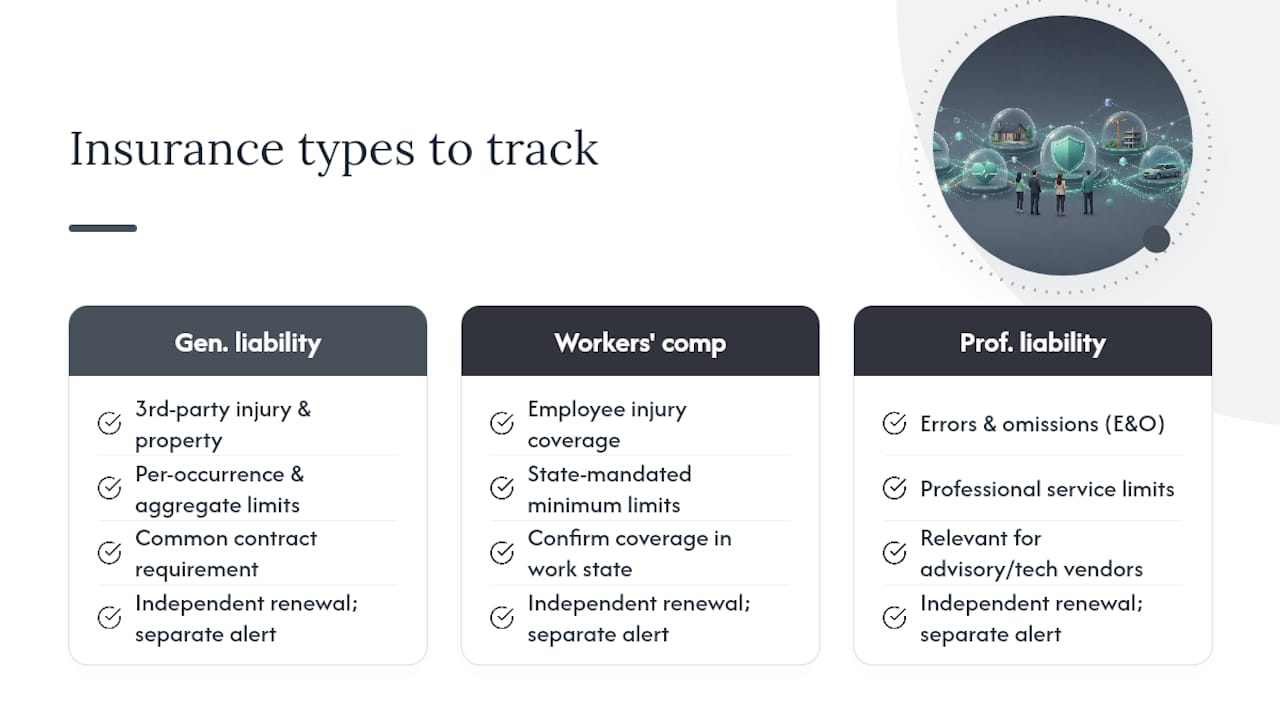
General liability covers third-party bodily injury and property damage, and it’s the coverage most contracts reference first. Check the per-occurrence and aggregate limits separately, since a vendor working multiple concurrent projects can exhaust their aggregate faster than expected.
Workers’ compensation protects against employee injury claims and is typically mandated by state law rather than contract choice, which means the minimum limit isn’t negotiable in most states. Confirm the vendor’s policy covers employees working in your specific state, since a certificate showing coverage in their home state doesn’t necessarily extend to work performed elsewhere.
Professional liability, also called errors and omissions coverage, matters most for vendors providing advisory, design, or technical services rather than physical labor. This policy type is often overlooked on physical project sites, but it’s essential for engineering firms, consultants, or software vendors integrated into your operations.
Each coverage type has its own renewal cycle, and a vendor’s general liability might renew in March while their workers’ comp renews in September. Tracking them independently, with separate expiration alerts for each policy line, catches gaps a bundled “certificate on file” checkbox would miss entirely.
How Do You Get Vendors to Take COI Requirements Seriously?
Vendors ignore certificate requests for a predictable reason: nobody explained why it matters or made compliance easy. Fixing both halves of that problem does more than any escalation email.
Start requirements conversations before the contract is signed, not after. Include insurance requirements in your onboarding packet with plain-language explanation of what’s needed and why, rather than a dense clause buried in a master service agreement that a vendor’s office manager skims once and forgets.
Make the submission process genuinely simple. A link-based upload that doesn’t require creating an account will get a faster response than a portal demanding registration, a pattern that shows up consistently in vendor-experience data across compliance platforms. Send renewal reminders well before expiration, ideally with a direct link to resubmit rather than a generic “your certificate is expiring” notice that leaves the vendor guessing what to do next.
For vendors who repeatedly submit incomplete or incorrect certificates, a short phone call explaining exactly which field was wrong tends to fix the recurring issue faster than another automated email. Some vendors don’t understand endorsement language and are relying on their insurance agent to fill things out correctly. Pointing them toward that conversation directly often resolves a problem that would otherwise repeat every renewal cycle.
How Do You Verify a Certificate Is Authentic and Not Fraudulent?
A certificate that looks complete isn’t automatically genuine, and a folder of accepted PDFs can create false confidence while masking real gaps in coverage.

Start by confirming the policy actually exists. Most legitimate certificates list a broker or agent contact, and calling that number directly to confirm the policy number, limits, and effective dates takes a few minutes and catches altered documents immediately. A vendor unwilling to provide broker contact information, or one whose broker doesn’t recognize the policy number, is a clear signal to slow down.
Cross-check the named insured against your actual contract. A mismatch, even a minor one like a similar-sounding subsidiary name, means the coverage may not extend to the entity you’re actually working with.
Watch for formatting inconsistencies that suggest a certificate was edited after issuance: mismatched fonts, misaligned text boxes, or a policy number format that doesn’t match the stated carrier’s typical numbering pattern. These are the kinds of details that automated OCR-based systems increasingly catch faster than a human skimming a PDF, since software compares formatting patterns across thousands of certificates rather than relying on one reviewer’s memory of what a genuine document should look like.
For high-risk vendor categories or large contracts, some organizations pay for third-party verification services that contact carriers directly to confirm policy status. That extra step costs money, but it costs far less than discovering a fraudulent certificate after a claim has already been filed.
A Practitioner’s Take on Rolling Out COI Tracking
Change management matters more than the software you pick. Roll out new requirements with operations and legal at the table from day one, not after you’ve already selected a platform, because their pushback on unrealistic timelines will save you from a rollout that stalls in month two.
Vendor friction during transition is real, and the fix isn’t better emails. It’s giving vendors more lead time than feels necessary and a submission path that takes less than five minutes.
The habit that actually protects you during an audit isn’t better document storage. It’s recording why a decision was made, not just that a document was filed. A timestamped PDF proves nothing about your judgment. A logged rationale does.
How WellsManager Keeps Compliance Visible for Oil and Gas Operators
Most compliance platforms are built for general contractors, which means they miss the specifics that matter to upstream operations: pollution liability requirements, per-well vendor tracking, and the tight link between field activity and payment approval. WellsManager was built specifically for independent oil and gas operators, and its real-time compliance notifications flag an expiring certificate before it becomes a payment risk, not after.

Because compliance status lives inside the same platform tracking field maintenance, vendor costs, and lease operating statements, there’s no separate system to reconcile. It functions as the single source of truth your team needs instead of chasing updates across a spreadsheet and an inbox, and that compliance data feeds directly into the invoice approval workflow so a non-compliant vendor gets flagged before a payment goes out, not discovered afterward.
If you’re evaluating a shift from manual tracking, request access to see the platform firsthand, and come prepared with a sample vendor list and your current contract requirements so the demo reflects your actual compliance workload. WellsManager’s approach to data handling is outlined in its privacy policy, worth a look if data ownership and security are part of your evaluation checklist.
Sources
- The Total Economic Impact™ of Microsoft Power Automate — Forrester TEI
- AICPA: SOC for Service Organizations
FAQ
What Is Certificate of Insurance Tracking?
It’s the ongoing process of collecting, verifying, and monitoring vendor insurance documentation to confirm coverage stays current and meets contract requirements, rather than a one-time check at onboarding.
How Much Does COI Tracking Software Cost?
Pricing typically scales with your active vendor count, plus one-time costs for integration and data migration; Forrester’s TEI methodology offers a framework for weighing that cost against hours saved on manual review.
What Is myCOI Tracking?
myCOI is one of several commercial platforms that automate certificate collection and compliance monitoring; when evaluating any platform in this category, including WellsManager for upstream operators, check the same core features: structured intake, decisioning logic, and a complete audit trail.
How Do You Find Your Certificate of Insurance?
Your certificate of insurance typically comes from your insurance broker or carrier, who issues it on request; if you’ve lost a copy, contact your broker directly rather than trying to recreate it, since only they can confirm the exact policy details.
What’s the Difference Between Manual and Automated COI Tracking?
Manual tracking relies on spreadsheets and email follow-up with no consistent audit trail, while automated platforms parse certificates, flag non-compliance automatically, and log every review decision for later reference.